 React Native · TypeScript
→
Recognized locally
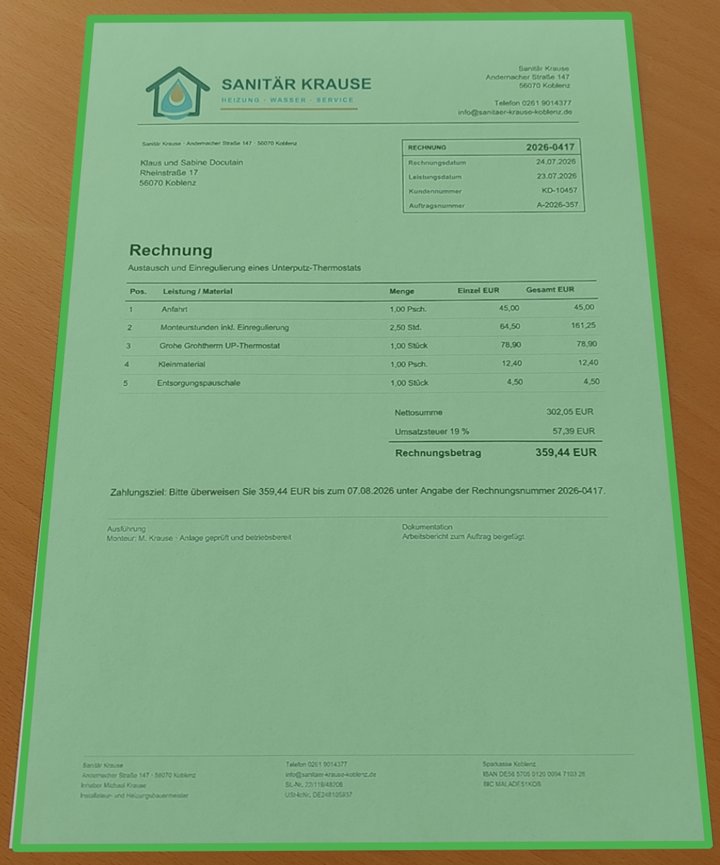
Payment data
RecipientSanitär Krause
AmountEUR 359.44
IBANDE58 5705 0120 0094 7103 28
PurposeInvoice 2026-0417
IBAN validated by Docutain
Updated 9 min readBy Daniel Weber
Integrate Photo Payment with React Native
This guide connects React Native and TypeScript to the native Docutain Photo Payment flow on Android and iOS.
One JavaScript entry point opens the native capture UI, recognizes GiroCode or invoice data locally and returns structured JSON. Your application keeps ownership of mapping, validation, confirmation and transfer authorization.
- Targets
- Android and iOS
- Language
- TypeScript
- Result
- JSON string or rejected Promise
- Processing
- Local in the native SDK
Jump to the React Native setup
The native workflow behind the TypeScript call
- The React Native screen invokes the Docutain bridge from a user action.
- The native Android or iOS component presents capture, import and review UI.
- Docutain reads a GiroCode when available or extracts fields from invoice text.
- The Promise resolves with JSON, resolves with an empty string in the configured edge case, or rejects on cancellation/error.
- TypeScript maps the result to the application's payment model before native banking controls continue.
Prepare both native projects
| Area | Requirement |
|---|
| Android | Android 5.0+, compileSdk 34+ and Android Gradle Plugin 8.0.2+ |
| iOS | iOS 11+ and an NSCameraUsageDescription |
| License | A key matching Android applicationId and iOS CFBundleIdentifier |
| Hardware | Representative physical devices with rear-facing cameras |
Use emulators for navigation and basic bridge tests only. Camera focus, auto-capture, scan quality and performance need physical devices.
Install and initialize the React Native SDK
1. Add the npm package
npm install @docutain/react-native-docutain-sdk
Complete the package's Android and iOS setup, including the iOS camera-purpose string and the recommended Android memory configuration.
2. Initialize before enabling the feature
import DocutainSDK from '@docutain/react-native-docutain-sdk';

async function initializeDocutain(): Promise<boolean> {
  const initialized = await DocutainSDK.initSDK(
    '<YOUR-LICENSE-KEY>'
  );

  if (!initialized) {
    // Read the SDK error and keep Photo Payment disabled.
    const error: string = await DocutainSDK.getLastError();
    reportInitializationError(error);
  }

  return initialized;
}
Launch Photo Payment and classify the outcome
import DocutainSDK from '@docutain/react-native-docutain-sdk';

type DocutainError = { code?: string; message?: string };

async function startPhotoPayment(): Promise<void> {
  try {
    const paymentData = await DocutainSDK.startPhotoPayment({
      // Customize scan, analysis and theming when required.
    });

    if (paymentData === '') {
      // No data was found. This is reachable when the
      // Empty Result Screen has been disabled.
      showManualEntry();
      return;
    }

    // Decode the JSON, apply app rules and prefill a draft.
    processPaymentData(paymentData);
  } catch (unknownError) {
    const error = unknownError as DocutainError;
    if (error.code === 'CANCELED') {
      return; // Expected user cancellation.
    }
    reportPhotoPaymentError(error);
  }
}
Do not report CANCELED as an application failure. Treat every other rejection as an integration or runtime error and keep sensitive invoice values out of telemetry.
Decode the JSON into a typed payment draft
{
  "Address": {
    "Name1": "Sanitär Krause",
    "Zipcode": "56068",
    "City": "Koblenz",
    "Street": "Musterstraße 17",
    "Bank": [{
      "BIC": "MALADE51KOB",
      "IBAN": "DE58570501200094710328"
    }]
  },
  "Date": "2026-04-17",
  "Amount": "359.44",
  "InvoiceId": "2026-0417",
  "Reference": "Invoice 2026-0417",
  "PaymentState": "ToBePaid",
  "SEPACreditor": "Sanitär Krause"
}
SEPACreditor is the payment recipient. Model fields as optional because invoices differ. The SDK returns only valid IBANs, but the application must still verify the intended recipient, amount and reference and show all payment values before authorization.
Configure analysis, UX and retry behavior
The configuration object exposes analysis, capture behavior, page editing, onboarding, Scan Tips, colors and the Empty Result Screen. Keep defaults during the first quality evaluation and change only requirements that belong to the host app's user journey.
const paymentData = await DocutainSDK.startPhotoPayment({
  analyzeConfig: {
    // Add the optional paid/to-be-paid classification.
    readPaymentState: true,
  },
  // The default Empty Result Screen offers retry and cancel.
});
BIC extraction can be disabled when the payment model does not use it; account for the resulting JSON shape in the mapper. GiroCode and invoice OCR remain one Photo Payment flow, so users do not need to choose a scanner first.
Test JavaScript state and both native implementations
- Start with the Android and iOS Showcase Apps, then use a trial license in the React Native app.
- Use the same approved invoice corpus on representative physical Android and iOS devices.
- Measure field-level correctness and manual corrections for recipient, IBAN, amount and reference.
- Test paper, screen and file inputs as well as invoices with and without GiroCode.
- Verify cancellation, empty result, initialization failure, bridge errors and retry/manual entry.
- Test app backgrounding, repeated launches, navigation teardown and prevention of double taps.
- Run TalkBack and VoiceOver checks around the native flow and the returned payment form.
Official resources
Technical sources last checked on September 13, 2026.
FREQUENTLY ASKED QUESTIONS
React Native Photo Payment integration
Yes. Supported payment data is recognized on the Android or iOS device without an external recognition server. The host app controls any subsequent storage or transfer.
DocutainSDK.startPhotoPayment returns the payment JSON string directly.
A rejected promise with error code CANCELED means the user canceled the flow.
No. It returns structured payment data. The banking app remains responsible for review, business rules, authorization and execution.