 iOS · Swift
→
Recognized locally
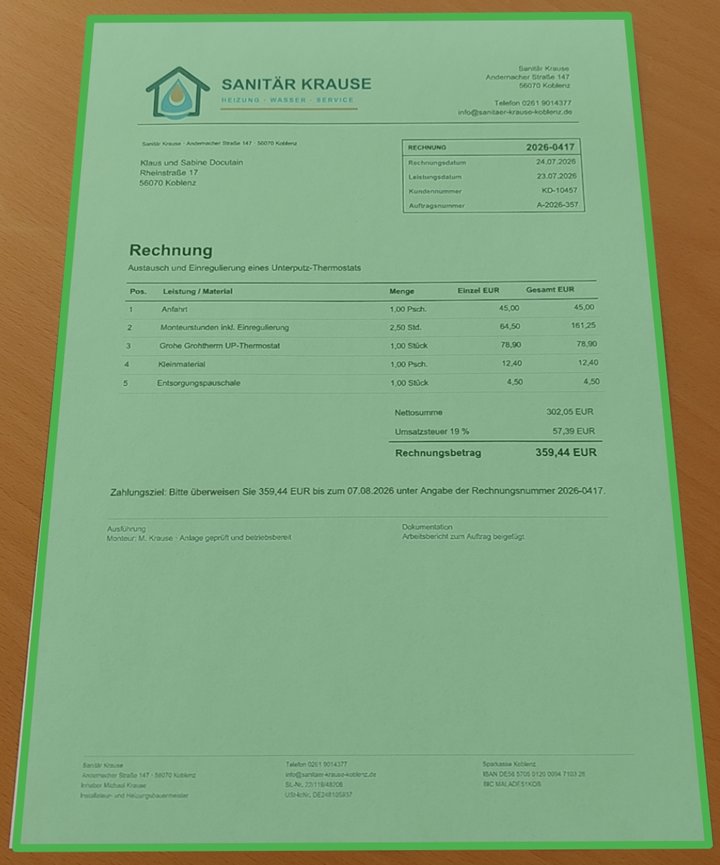
Payment data
RecipientSanitär Krause
AmountEUR 359.44
IBANDE58 5705 0120 0094 7103 28
PurposeInvoice 2026-0417
IBAN validated by Docutain
Updated
9 min read
By Jonas Richter
Integrate Photo Payment on iOS with Swift
This guide builds a complete invoice-to-transfer flow with the native Docutain UI, Swift and locally recognized payment data.
Users can photograph an invoice, import a PDF or image, or capture a GiroCode. Docutain returns structured JSON with valid IBANs so the host app can apply its own rules and prefill a payment draft.
Recognition stays on the iPhone or iPad. Your banking app remains responsible for storage, user confirmation, authentication and execution of the transfer.
- Platform
- iOS 13 or later
- Language
- Swift
- Result
- Nullable JSON string
- Processing
- Local on the device
Jump to the Swift setup
The iOS payment workflow you are building
- The user starts Photo Payment from the banking app.
- The native Docutain UI captures or imports the invoice and checks for a GiroCode.
- If no usable GiroCode is available, payment data is extracted from the visible invoice text.
- The delegate receives structured JSON or an explicit cancellation/empty outcome.
- The host app validates and displays a payment draft before its existing authorization flow begins.
Prepare the iOS project
| Component | Requirement |
|---|
| Operating system | iOS 13 or later |
| Architecture | arm64 |
| Camera | A rear-facing camera and an NSCameraUsageDescription |
| License | A key issued for the exact bundle identifier |
| Evaluation | A physical iPhone or iPad; the SDK is not functional in the Simulator |
Add a clear camera-purpose string to the app target. The wording should explain the invoice-scanning use case rather than use a generic permission message.
<key>NSCameraUsageDescription</key>
<string>Scan invoices to prefill payment details.</string>
Install and initialize Docutain
1. Add the SDK
Integrate the supplied XCFramework or install the SDK with CocoaPods:
pod 'DocutainSdk'
2. Initialize before exposing the payment action
The license key is tied to the app's bundle identifier. If initialization fails, disable Photo Payment and handle the SDK error through the app's support concept.
import DocutainSdk

func application(
    _ application: UIApplication,
    didFinishLaunchingWithOptions launchOptions:
        [UIApplication.LaunchOptionsKey: Any]?
) -> Bool {
    if !DocutainSDK.initSDK(licenseKey: "<YOUR-LICENSE-KEY>") {
        // Initialization failed: read the SDK error and disable the feature.
        let error = DocutainSDK.getLastError()
        handleInitializationError(error)
    }
    return true
}
Launch Photo Payment and handle every outcome
Implement PhotoPaymentDelegate on the presenting view controller. The callback distinguishes recognized data, an empty result and user cancellation.
import DocutainSdk

final class PaymentViewController: UIViewController,
                                   PhotoPaymentDelegate {
    @IBAction private func photoPaymentTapped() {
        let config = PhotoPaymentConfiguration()
        UI.startPhotoPayment(delegate: self, config: config)
    }

    func didFinishPhotoPayment(paymentData: String?) {
        guard let paymentData = paymentData else {
            // The user canceled the flow.
            return
        }

        guard !paymentData.isEmpty else {
            // No data was found. This is reachable when the
            // Empty Result Screen has been disabled.
            showManualEntry()
            return
        }

        // Decode the JSON, apply app rules and prefill a draft.
        processPaymentData(paymentData)
    }
}
Map the payment JSON into a draft
A successful callback returns a JSON string. Depending on the invoice and configuration, it can include recipient and address data, one or more bank connections, date, amount, invoice ID, reference and payment state.
{
  "Address": {
    "Name1": "Sanitär Krause",
    "Zipcode": "56068",
    "City": "Koblenz",
    "Street": "Musterstraße 17",
    "Bank": [{
      "BIC": "MALADE51KOB",
      "IBAN": "DE58570501200094710328"
    }]
  },
  "Date": "2026-04-17",
  "Amount": "359.44",
  "InvoiceId": "2026-0417",
  "Reference": "Invoice 2026-0417",
  "PaymentState": "ToBePaid",
  "SEPACreditor": "Sanitär Krause"
}
SEPACreditor is the payment recipient. Not every invoice contains every field, so treat missing values as a normal result. Docutain only returns valid IBANs; the host app must still verify that recipient, IBAN, amount and reference belong together and display them before authorization.
Configure the flow for the banking use case
PhotoPaymentConfiguration controls capture behavior, page editing, onboarding, Scan Tips, colors, the Empty Result Screen and payment analysis. GiroCode recognition is enabled by default, allowing QR-equipped and conventional invoices to use one entry point.
let config = PhotoPaymentConfiguration()

// GiroCode and invoice OCR share one flow.
config.allowGiroCode = true

// Add the optional paid/to-be-paid classification.
config.analyzeConfig.readPaymentState = true

UI.startPhotoPayment(delegate: self, config: config)
Keep the Empty Result Screen during the first evaluation. It gives users a clear retry path when no IBAN, recipient or amount can be read. Disable it only when the host app provides an equivalent fallback.
For invoices received through an iOS open/share flow, pass the readable PDF or image URL through externalURL:
let config = PhotoPaymentConfiguration()
config.externalURL = incomingInvoiceURL
UI.startPhotoPayment(delegate: self, config: config)
Security and production test checklist
- Start with the iOS Showcase App, then test the integrated app with its own trial license.
- Use representative physical iPhones and iPads for focus, auto-capture, scan quality and GiroCode recognition.
- Include paper invoices, folded pages, screen-displayed documents, PDFs and shared images.
- Measure correct, missing and incorrect values per payment field—not only whether any result was returned.
- Test cancellation, empty results, unreadable files and retry/manual-entry paths.
- Verify VoiceOver, Dynamic Type, camera-permission denial and the handoff to the app's confirmation screen.
- Keep approved or anonymized test documents out of analytics and diagnostic logs.
Official resources
Technical sources last checked on September 13, 2026.
FREQUENTLY ASKED QUESTIONS
Integrating Photo Payment on iOS
Yes. Supported payment data is recognized locally on the device. The host app controls any subsequent storage, transfer and payment processing.
No. The app can build and run there, but the Docutain SDK provides no functional processing in the Simulator. Use a representative physical iPhone or iPad.
Yes. PhotoPaymentConfiguration.externalURL accepts a readable PDF or image URL received through an open-with or share workflow.
No. It returns structured payment data as JSON. The banking app presents, validates and authorizes the transfer through its own workflow.