 Android · Kotlin
→
Structured JSON
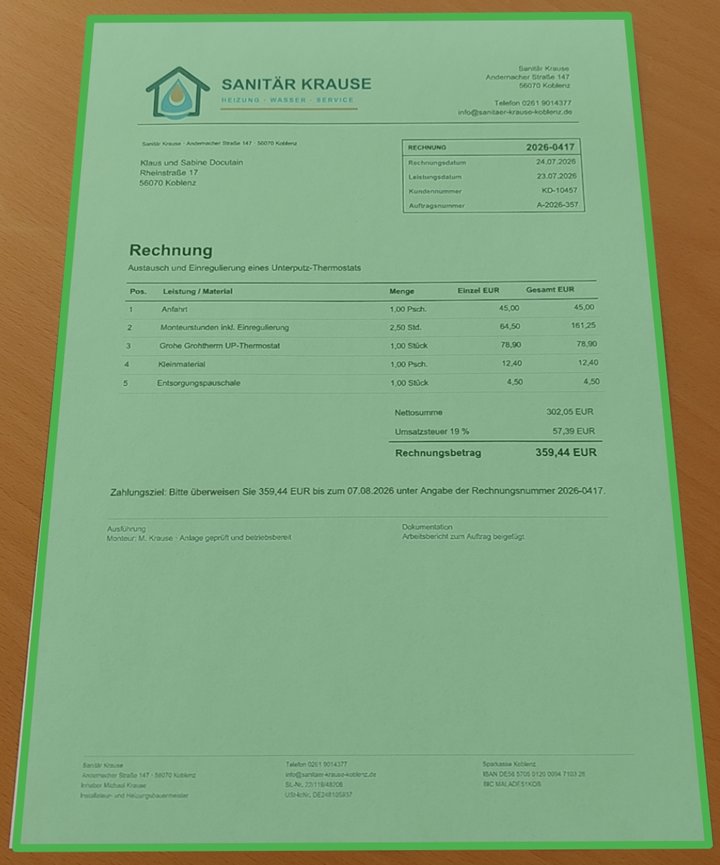
Payment result
RecipientSanitär Krause
AmountEUR 359.44
IBANDE58 5705 0120 0094 7103 28
PurposeInvoice 2026-0417
IBAN validated by Docutain
Updated
10 min read
By Marvin Frankenfeld
Integrate Photo Payment on Android with Kotlin
This guide shows how to add a production-ready invoice-to-transfer flow with Kotlin and Docutain SDK 1.9.0.0.
Users can scan a paper invoice, import a PDF or image, or read a GiroCode. Docutain returns the payment data as JSON, including only valid IBANs, so that the host app can apply its business rules and prefill its own transfer screen.
Recognition and IBAN validation run locally on the device. The banking app remains in control of user confirmation, its payment rules, authentication and the final SEPA credit transfer.
- SDK version
- Android 1.9.0.0
- Minimum version
- Android 6.0 / API 23
- Inputs
- Camera, PDF, image, GiroCode
- Processing
- 100% local and offline
Jump to the Kotlin setup
The payment workflow you are building
A robust photo-payment integration separates data capture from payment authorization:
- The user opens the payment flow from the banking app.
- Docutain scans or imports the invoice and checks for a GiroCode.
- If no usable GiroCode is available, the SDK extracts payment data from the visible invoice text.
- The SDK returns structured JSON to the host app.
- The app applies its business rules and displays the data for review before its established authorization flow starts.
This design gives users one entry point for QR-equipped and conventional invoices. It also keeps payment execution outside the SDK and within the bank's existing controls.
What changed with Docutain SDK 1.9
Since version 1.9, Photo Payment can extract GiroCode data directly. The option allowGiroCode is enabled by default, so a separate barcode flow is no longer required for this use case.
- One user journey: GiroCode and invoice OCR are handled by the same Photo Payment flow.
- Share and open support: on Android, an incoming PDF or image can be forwarded through
openWithIntent.
- Purpose-built guidance: Photo-Payment-specific onboarding and scan-tip defaults also cover GiroCode capture.
- Local processing: both QR data and payment information from the invoice are evaluated on the device.
Android prerequisites
| Component | Requirement for SDK 1.9.0.0 |
|---|
| Language | Kotlin in this guide; Java is also supported |
| Minimum Android version | Android 6.0 / API level 23 |
| Compile SDK | API level 34 or newer |
| Android Gradle Plugin | 8.0.2 or newer |
| License | A key that matches the app's applicationId |
| Test hardware | A physical device with a rear-facing camera |
Add and initialize Docutain SDK 1.9.0.0
1. Add the two Photo Payment modules
Make sure Maven Central is configured, then add the UI and DataExtraction modules to the app module:
def docutainSdkVersion = '1.9.0.0'
implementation("de.docutain:Docutain-SDK-UI:$docutainSdkVersion")
implementation("de.docutain:Docutain-SDK-DataExtraction:$docutainSdkVersion")
2. Initialize the SDK
Initialize Docutain before exposing SDK functionality. The placeholder below must be replaced by the license key issued for the app's exact applicationId.
import de.docutain.sdk.DocutainSDK;

class MainActivity : AppCompatActivity() {

    override fun onCreate(savedInstanceState: Bundle?) {
        super.onCreate(savedInstanceState)
        if(!DocutainSDK.initSDK(this.application, "<YOUR-LICENSE-KEY>")){
            //init of Docutain SDK failed, get the last error message
            val error = DocutainSDK.getLastError()
            //your logic to deactivate access to SDK functionality
        }
    }
}
Do not allow the scan action to continue after initSDK() returns false. Log or surface getLastError() according to the app's support concept without exposing sensitive information.
Launch Photo Payment
Register the Activity Result contract once and launch it from the app's payment action:
import de.docutain.sdk.ui.PhotoPaymentConfiguration
import de.docutain.sdk.ui.PhotoPaymentResult

val photoPaymentResult = registerForActivityResult(PhotoPaymentResult()) { data ->
    if(data != null){
        if(data.isNotEmpty()){
            // data is a JSON string containing the information
            // extract the fields you need and pass it on to your payment sheet
        } else{
            // no data was extracted at all
            // Note: this case is only reachable, if you disabled the Empty Result Screen
        }
    } else{
        // user canceled scan process
    }
}

myButton.setOnClickListener {
    val paymentConfig = PhotoPaymentConfiguration()
    photoPaymentResult.launch(paymentConfig)
}
The default configuration provides the complete capture, review and extraction flow. Customize UI, onboarding and Scan Tips only where this improves the bank's existing design and user guidance.
Process the JSON result
A successful result is returned as a JSON string. The default structure can contain the following fields:
{
    "Address":
    {
        "Name1": "DB Fernverkehr AG",
        "Name2": "",
        "Name3": "",
        "Zipcode": "60643",
        "City": "Frankfurt am Main",
        "Street": "BahnCard-Service",
        "Phone": "0302970",
        "CustomerId": "",
        "Bank": [{"BIC": "PBNKDEFFXXX",
        "IBAN": "DE02100100100152517108"}]
    },
    "Date": "2024-10-14",
    "Amount": "244.00",
    "InvoiceId": "2023174086",
    "Reference": "RNr:2023174086 vom 14.10.2024",
    "SEPACreditor": "DB Vertrieb GmbH"
}
Map only the fields needed by the payment form and normalize their display formats in the host app. Docutain validates the IBAN and returns it only when it is valid. The host app still applies its own requirements to recipient, amount and reference. Extracted data should prefill a draft; it must not trigger a transfer automatically.
Combine GiroCode and OCR in one flow
A GiroCode is an EPC QR code containing data for a SEPA credit transfer. In SDK 1.9, PhotoPaymentConfiguration.allowGiroCode defaults to true, so no additional configuration is required for the combined flow.
| Invoice input | Primary extraction path | Application behavior |
|---|
| Valid GiroCode | Decode structured EPC payment data | Apply business rules and prefill the transfer screen |
| No GiroCode | Read payment data from invoice text | Apply business rules and prefill the same transfer screen |
| Unreadable or incomplete result | Show the SDK's retry guidance or app fallback | Allow correction or manual entry |
| Shared PDF or image | Pass the incoming Android intent via openWithIntent | Continue in the same Photo Payment flow |
For background and user-facing terminology, see how GiroCode payments work. For the broader product and platform scope, visit the Photo Payment SDK page.
Security and test checklist
On-device recognition reduces the amount of invoice data that needs to leave the device, but the complete banking workflow still needs application-level controls.
- Confirm the valid IBAN belongs to the intended recipient and apply the app's rules for amount, recipient and supported character sets.
- Always show extracted data before the existing authorization step.
- Handle cancellation, empty results, malformed files and incomplete GiroCodes.
- Test paper invoices, folded documents, screen-displayed invoices, PDFs and images received through Android share/open actions.
- Verify process recreation, camera permissions, memory pressure and accessibility in the host app.
- Test against representative real invoices with approved or anonymized data.
Official resources
Technical sources last checked on July 30, 2026.
FREQUENTLY ASKED QUESTIONS
Integrating Photo Payment on Android
Yes. Docutain scans and extracts supported payment data locally on the device. The host app controls any later storage, transfer and payment processing.
Yes. Since SDK 1.9, GiroCode extraction is part of Photo Payment and is enabled by default through allowGiroCode.
Yes. On Android, supported PDF and image files received through ACTION_SEND, ACTION_SEND_MULTIPLE or ACTION_VIEW can be passed through openWithIntent.
No. The SDK extracts payment data and validates the returned IBAN. The banking app applies its own business rules, presents the result to the user and performs its authorization and transfer workflow.
Docutain SDK 1.9.0.0 requires Android 6.0, API level 23, or newer. The app must compile with API level 34 or newer.