 .NET MAUI · C#
→
Recognized locally
Payment data
RecipientSanitär Krause
AmountEUR 359.44
IBANDE58 5705 0120 0094 7103 28
PurposeInvoice 2026-0417
IBAN validated by Docutain
Updated
9 min read
By Daniel Weber
Integrate Photo Payment with .NET MAUI
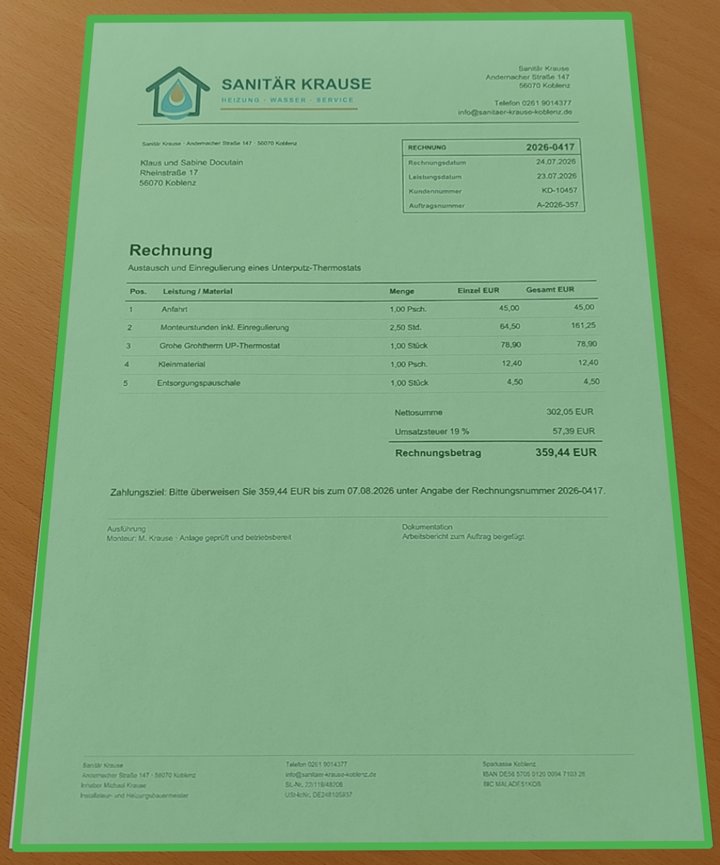
This guide implements one asynchronous C# flow for Photo Payment on Android and iOS, from initialization to a reviewed payment draft.
The Docutain MAUI package presents native capture UI, recognizes invoice or GiroCode data locally and returns structured JSON. The host application decides how to validate, display and authorize the result.
- Targets
- Android and iOS
- Package
- Docutain.SDK.MAUI
- API
- Async C#
- Processing
- Local on the device
Jump to the MAUI setup
One C# workflow, two native targets
- The shared MAUI UI invokes Photo Payment from a user action.
- Docutain opens the native Android or iOS capture and review interface.
- The SDK reads a GiroCode when available or extracts payment data from the invoice text.
- The awaited call returns JSON, an empty result or
null.
- The shared application layer maps the result into its payment model; target-specific authentication and payment handling continue as usual.
Prepare the Android and iOS projects
| Target | What to verify |
|---|
| Shared project | A valid ApplicationId and a matching Docutain license |
| Android | Rear-facing camera and memory configuration for high-resolution images |
| iOS | NSCameraUsageDescription with a user-facing invoice-scanning reason |
| Testing | Representative physical Android and iOS devices |
Android emulators can help with navigation and basic integration checks. On iOS, the app can build and run in the Simulator, but Docutain does not provide functional processing there.
Install and initialize the MAUI SDK
1. Install the NuGet package
dotnet add package Docutain.SDK.MAUI
2. Initialize Docutain once
Initialize the SDK before any feature is enabled. The license is bound to the application's configured identifier.
using Docutain.SDK.MAUI;

public partial class App : Application
{
    public App()
    {
        InitializeComponent();

        if (!DocutainSDK.InitSDK("<YOUR-LICENSE-KEY>"))
        {
            // Initialization failed: capture the SDK error and
            // keep Photo Payment disabled in the application.
            var error = DocutainSDK.LastError;
            HandleInitializationError(error);
        }

        MainPage = new MainPage();
    }
}
Launch Photo Payment asynchronously
Await the native flow so navigation and result handling stay in one explicit control path.
using Docutain.SDK.MAUI;

private async Task StartPhotoPaymentAsync()
{
    try
    {
        var config = new PhotoPaymentConfiguration();
        string? paymentData = await UI.StartPhotoPayment(config);

        if (paymentData is null)
        {
            // The user canceled the flow.
            return;
        }

        if (paymentData.Length == 0)
        {
            // No data was found. This is reachable when the
            // Empty Result Screen has been disabled.
            await ShowManualEntryAsync();
            return;
        }

        // Decode the JSON, apply app rules and prefill a draft.
        ProcessPaymentData(paymentData);
    }
    catch (Exception exception)
    {
        HandlePhotoPaymentError(exception);
    }
}
Map the result into a payment model
The successful result is a JSON string. Parse it into a dedicated DTO rather than binding raw SDK output directly to the transfer screen.
{
  "Address": {
    "Name1": "Sanitär Krause",
    "Zipcode": "56068",
    "City": "Koblenz",
    "Street": "Musterstraße 17",
    "Bank": [{
      "BIC": "MALADE51KOB",
      "IBAN": "DE58570501200094710328"
    }]
  },
  "Date": "2026-04-17",
  "Amount": "359.44",
  "InvoiceId": "2026-0417",
  "Reference": "Invoice 2026-0417",
  "PaymentState": "ToBePaid",
  "SEPACreditor": "Sanitär Krause"
}
SEPACreditor is the payment recipient. Fields may be missing when they are not present or not readable on an invoice. Docutain returns an IBAN only when it is valid; application-level checks still need to confirm the relationship between recipient, IBAN, amount and reference.
Configure analysis and fallback behavior
The default configuration provides capture, review and extraction. Use the same object to tune scan behavior, page editing, onboarding, Scan Tips, colors and the Empty Result Screen.
var config = new PhotoPaymentConfiguration();

// Include the optional paid/to-be-paid classification.
config.AnalyzeConfig.ReadPaymentState = true;

// Keep the default retry guidance during evaluation.
string? paymentData = await UI.StartPhotoPayment(config);
BIC extraction can be disabled if the target payment model does not use it. Keep that decision aligned with the JSON mapping: when BIC is disabled, the bank data shape changes to an IBAN list.
The Empty Result Screen is shown when no IBAN, recipient or amount was found. It gives the user a retry or cancel path; disable it only when the MAUI app supplies equivalent guidance and manual entry.
Test both native implementations, not only shared code
- Use the Android and iOS Showcase Apps for an initial scan-quality check.
- Test the integrated app on representative physical devices for focus, auto-capture and low-light behavior.
- Cover paper invoices, folded pages, PDFs, images and GiroCodes.
- Record correct, missing and incorrect values per payment field and the resulting manual correction effort.
- Verify cancellation, empty results, initialization failure and retry/manual-entry behavior.
- Run target-specific accessibility checks and verify that shared navigation survives app backgrounding.
- Keep recognized invoice data out of crash reports and analytics unless the application's governance explicitly permits it.
Official resources
Technical sources last checked on September 13, 2026.
FREQUENTLY ASKED QUESTIONS
.NET MAUI Photo Payment integration
Yes. Call and await UI.StartPhotoPayment. It returns a JSON string, an empty string if no data was extracted in the corresponding configuration, or null when the user cancels.
The Docutain .NET MAUI package provides the mobile workflow for Android and iOS targets. Camera behavior and recognition quality should be tested on physical devices.
No. Recognition runs locally on the device. Any later transfer or storage is controlled by the host application.
No. The SDK returns structured payment data. The banking application remains responsible for review, business rules, authorization and execution.